Export report from BI Book
Last updated 8 months ago
This page provides guidelines on how to export either the full report or selected report page(s) straight from BI Book.
Supported export formats: pdf/pptx/png.
Note: this feature is not available by default. Please contact your admin in order to enable it.
In order to export a report:
Open a report you wish to export/download.
On the Action bar click "Export report" button:

Select the settings for report export:
In "Export report file" window you can also see how many downloads are left there for your company. If you wish to upgrade the number of downloads per day, please contact support@bibook.com. By default 5 downloads per day are available if the report export is enabled.
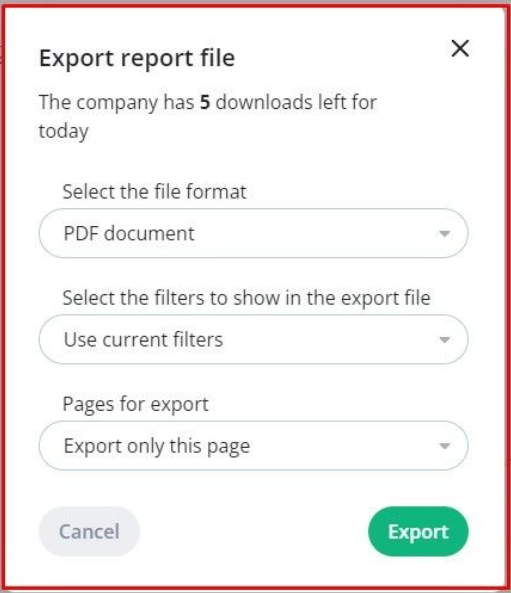
Select the file format available formats:
PDF document
PNG image
PPTX Power Point
Select the filters to show in the export file:
Use default filters - select this option if you wish to export a report/report page with default report filters
Use current filters - select this option if you wish to export a report/report page with your filters
Pages for export:
Export only this page - when selected, the report page you have open will be downloaded
Export selected pages - choose the pages you wish to download
Export all pages - export the whole report
Click "Export".
Report export might take some time. Either the report will be automatically downloaded or you will receive a download link via your email.
In case if something went wrong during the export, you will receive corresponding email notification.
Limitations
Only one report at the time can be downloaded. If you would like to export the same report/report page again or another report, please wait until the previous export is finished.
When you select PNG image format for export, you cannot select pages for export - only "Export only this page" is available.
The number of downloads is per company per day. Please contact support@bibook.com if you would like to increase the number of downloads.
Was this helpful?
Still need help? Ask the team