BI Book Reports Embedding

Last updated About 1 month ago

BI Book Reports Embedding feature allows the creation of shareable links for embedding BI Book reports into various external software, enhancing data accessibility and collaboration.

Prerequisites

  • Only Admins can create BI Book Report embed links

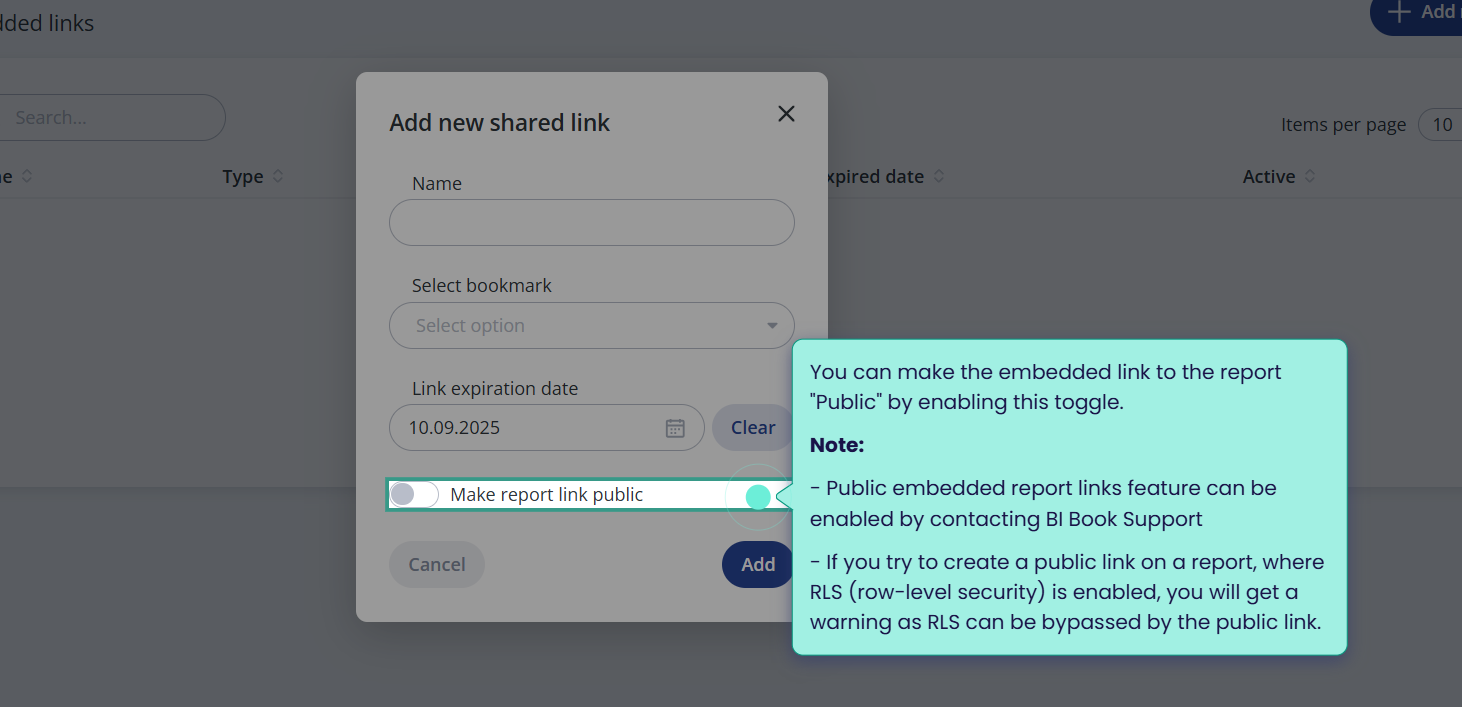
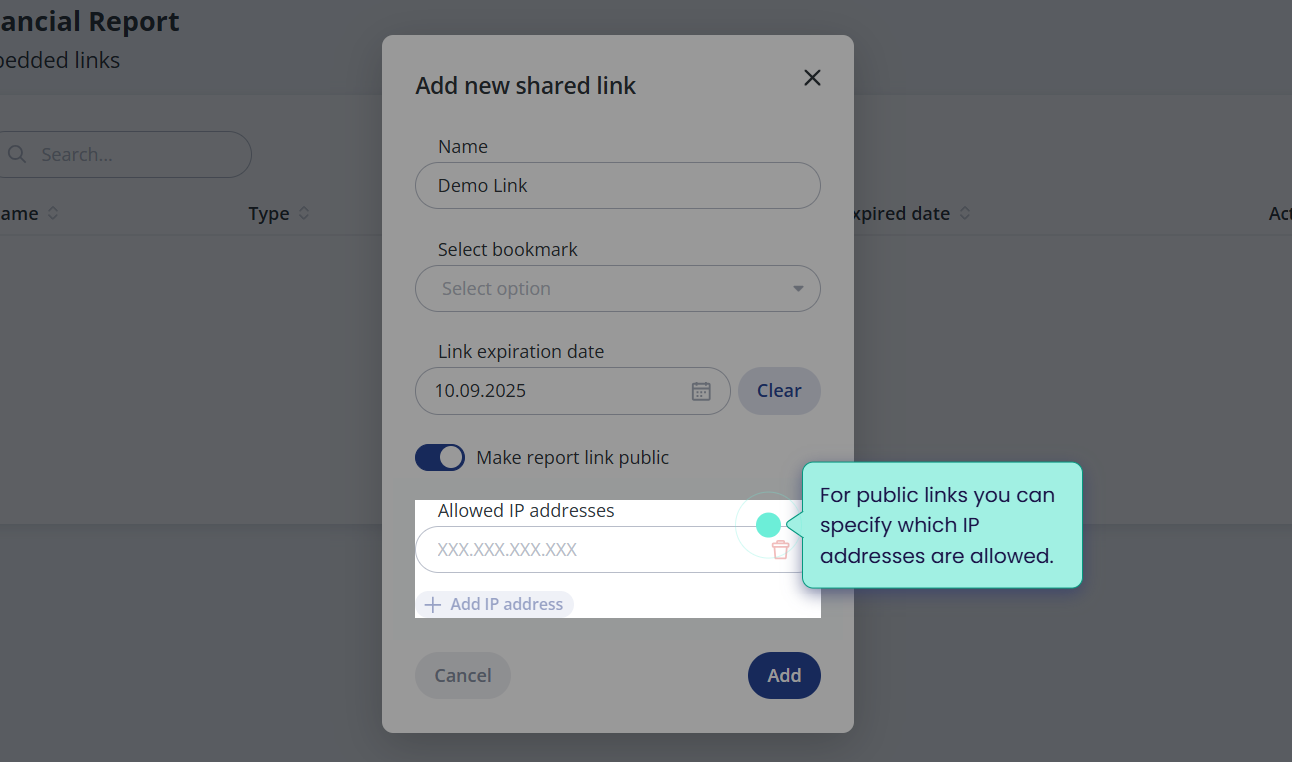
  • Public access mode is not available by default, unlike private mode, due to information security considerations. If you need to enable public access mode, please contact BI Book Support Team.

Access modes

  • Private - requires a user to login, using one of the available authentication methods.

πŸ’‘To ensure the best possible user experience, when using private embed links, we highly recommend to setup SSO authentication in your BI Book environment.

  • Public - when enabled, allows user to view a BI Book report without logging in. This can be useful when displaying reports on for example TV monitors.

    • Note: if row level security is enabled on the report, the role applied is the user's who generated the public link

Supported methods of embedding

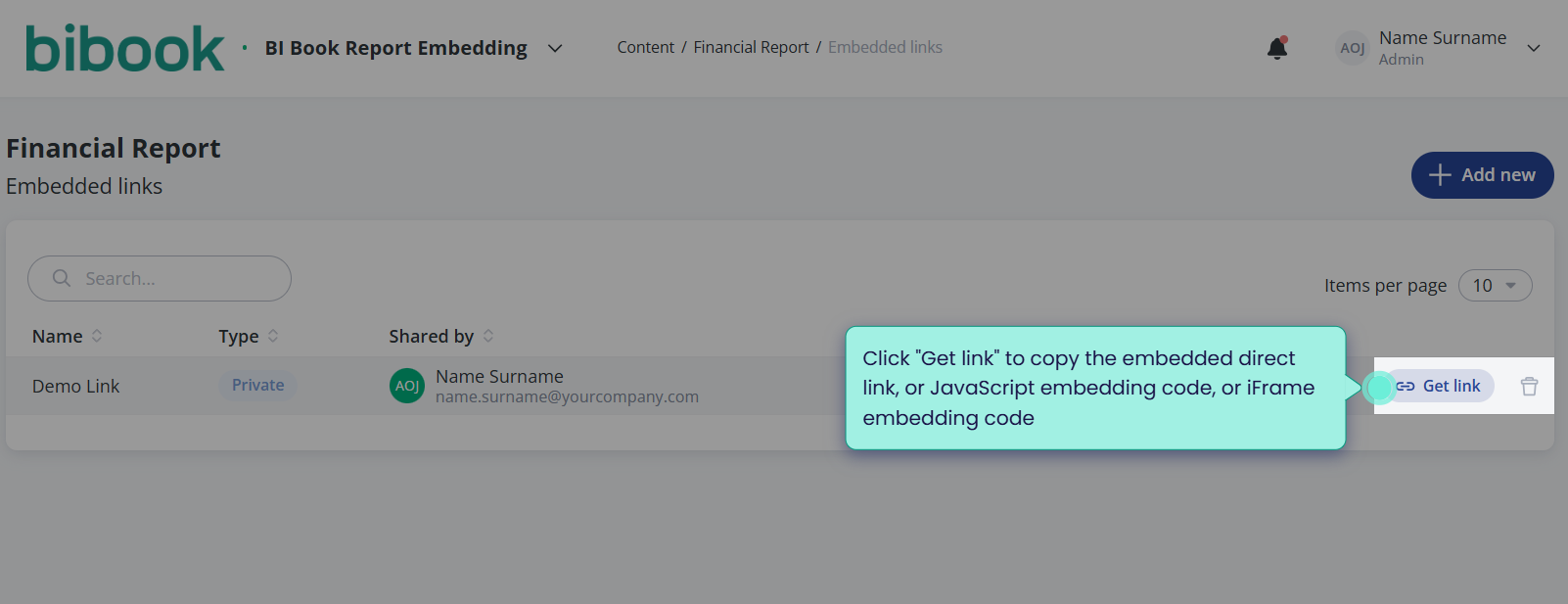
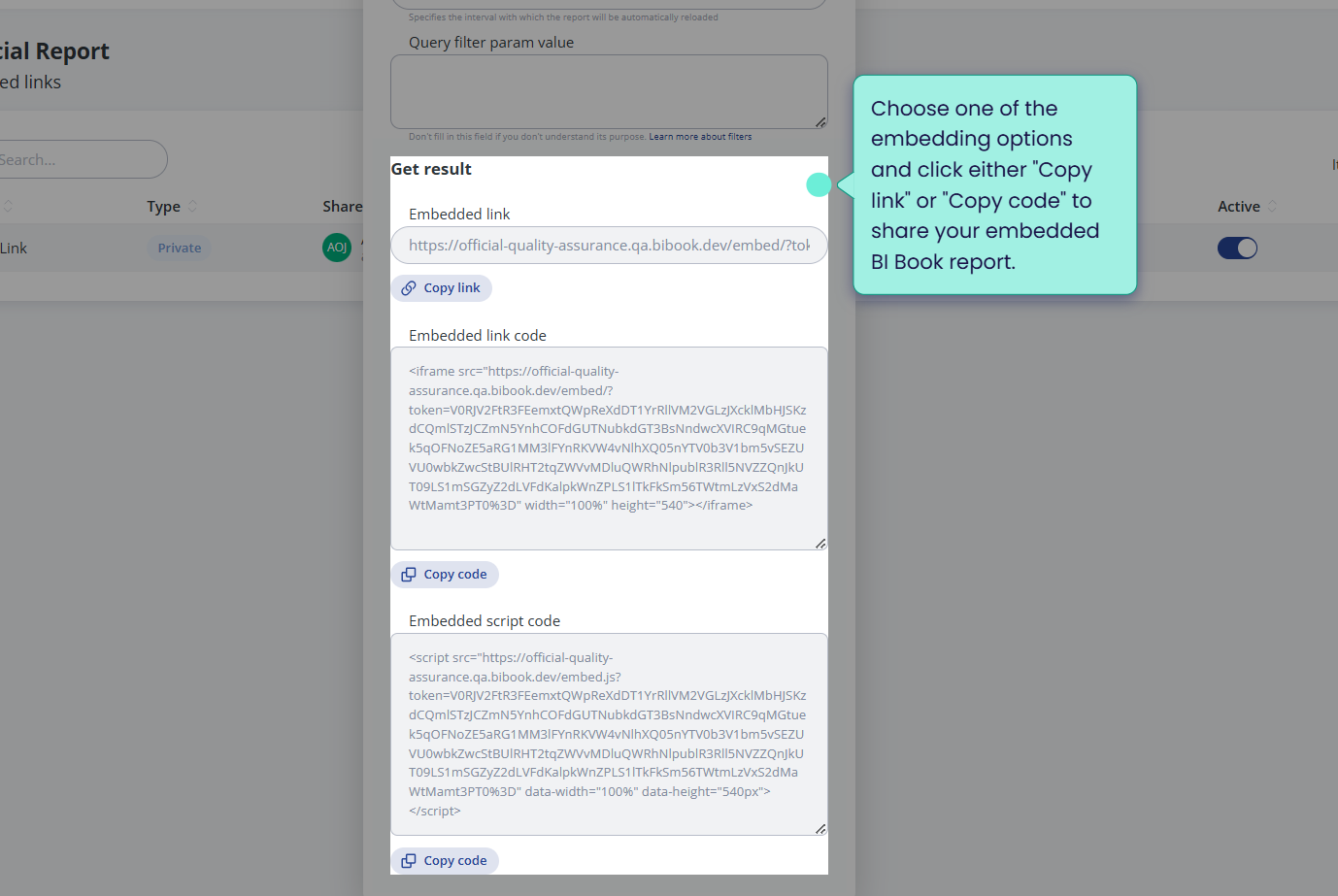
  • Direct link embedding method - allows to share the BI Book Report embedding by simply copying the link.

  • Embedding using JavaScript - embed your BI Book report to a website, CRM, etc. by simply copying the code. We recommend to use this embedding method over iFrame embedding for more seamless website integration experience. For example, iFrame might requires users to "accept" popups in the browser from third parties (BI Book), etc.

  • iFrame embedding - embed your BI Book report to a website, CRM, etc. by simply copying the code

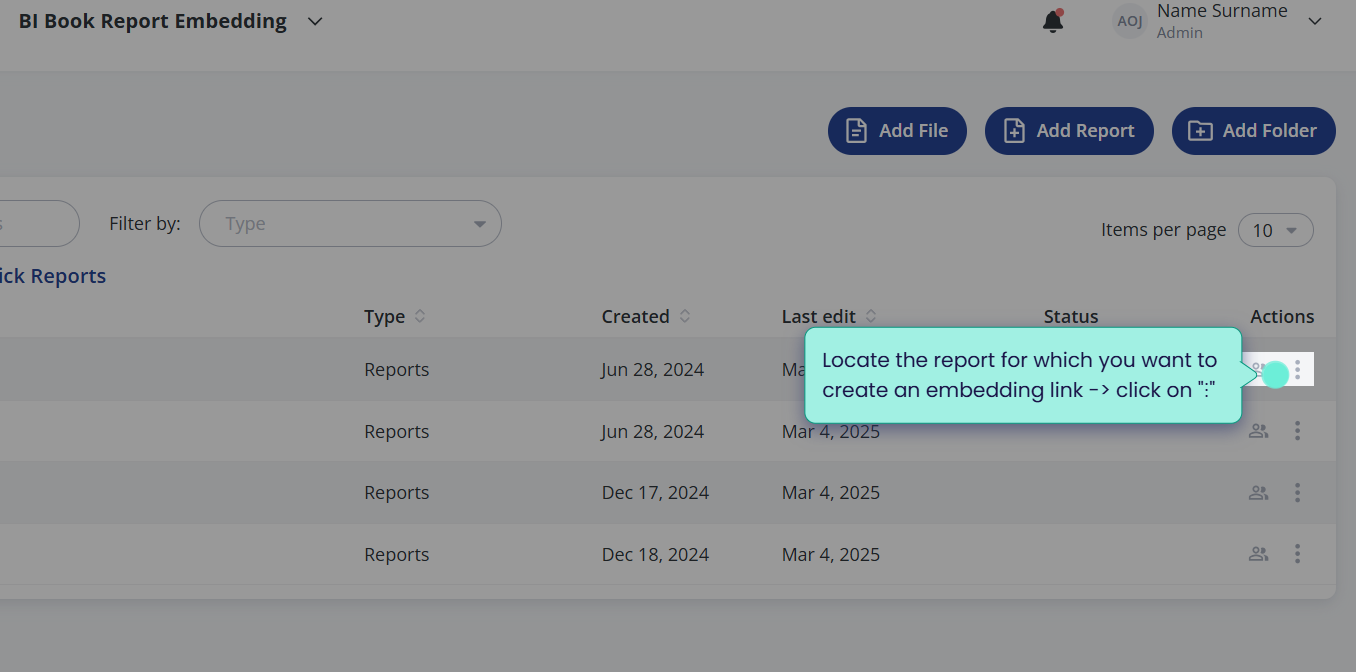
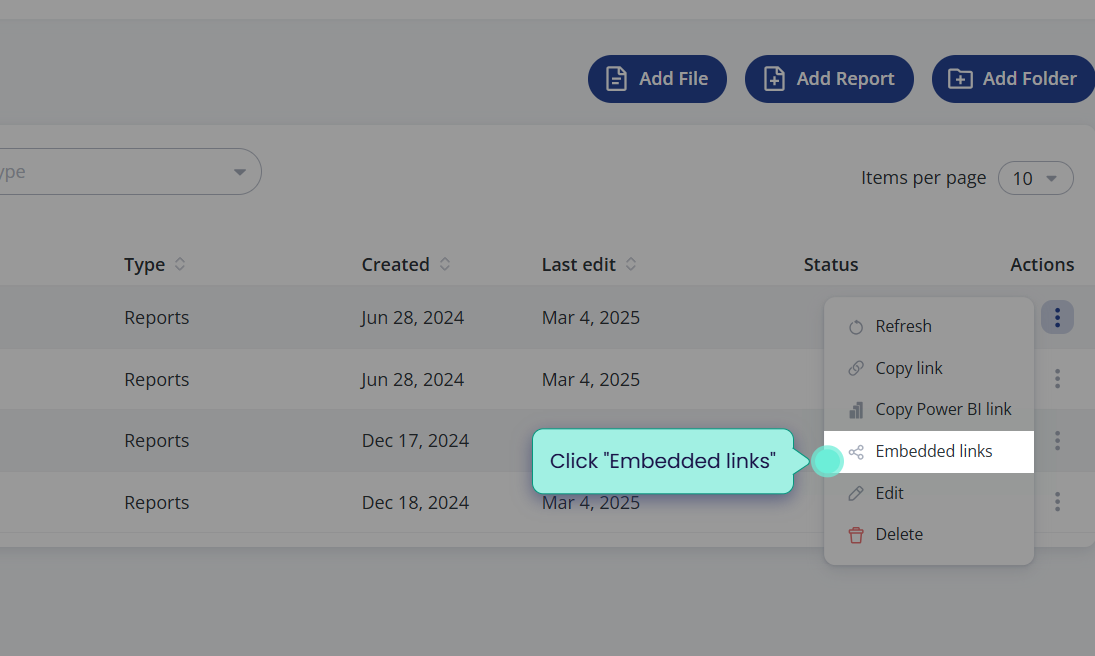
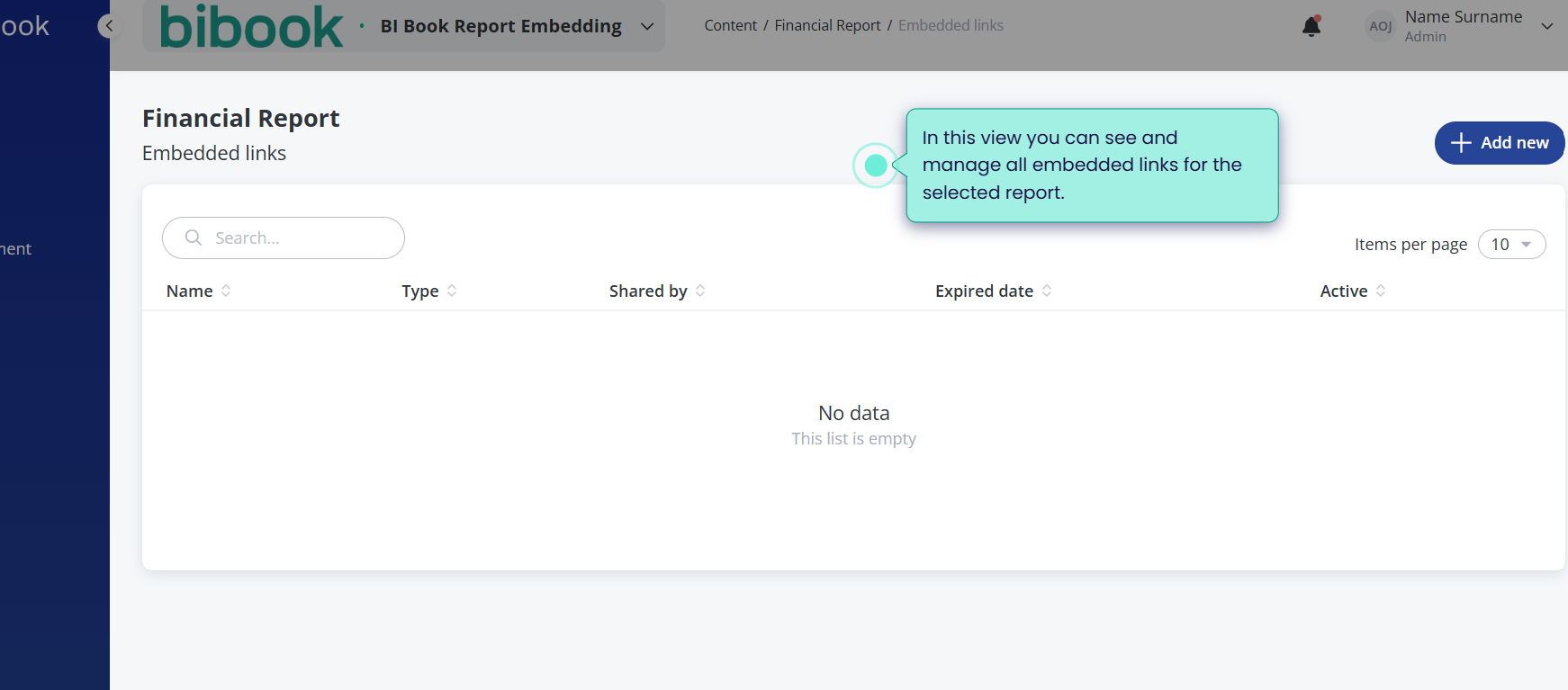
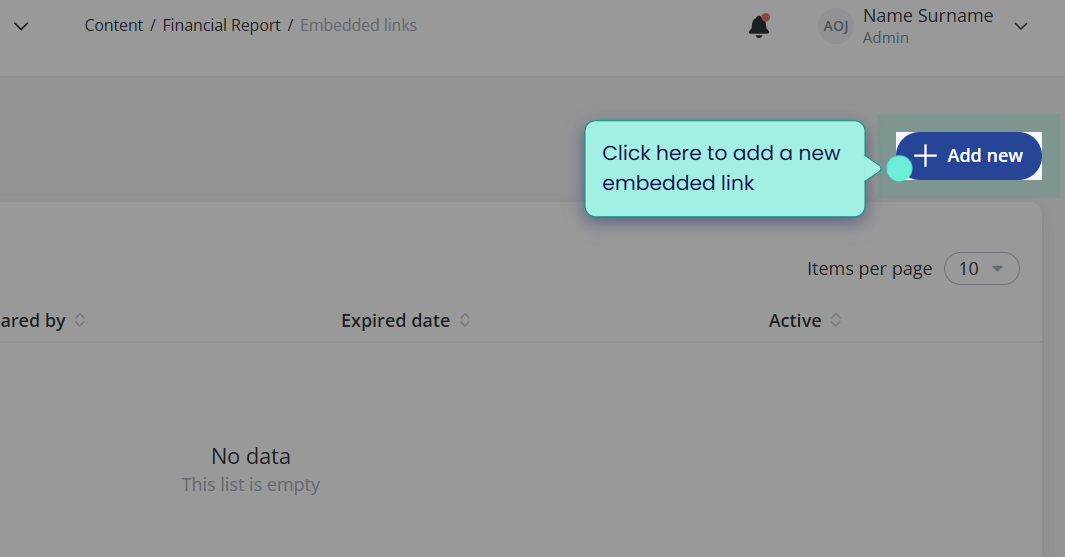
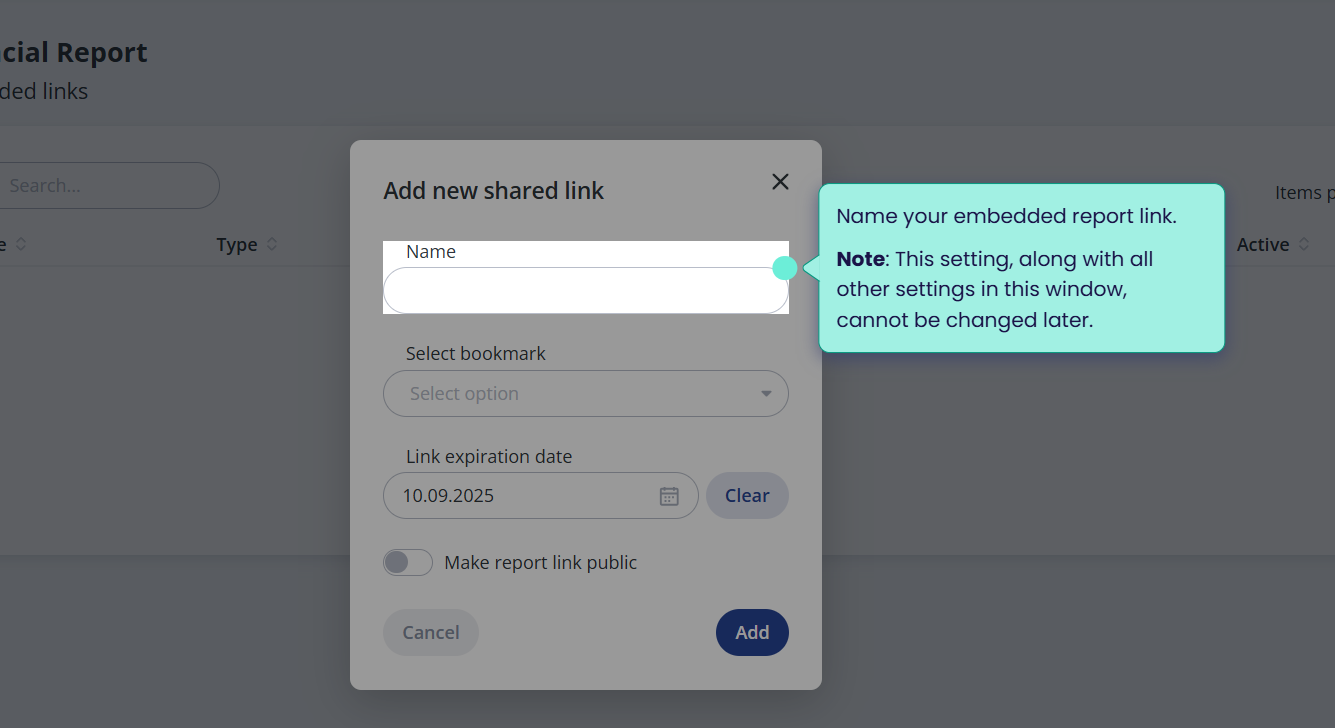
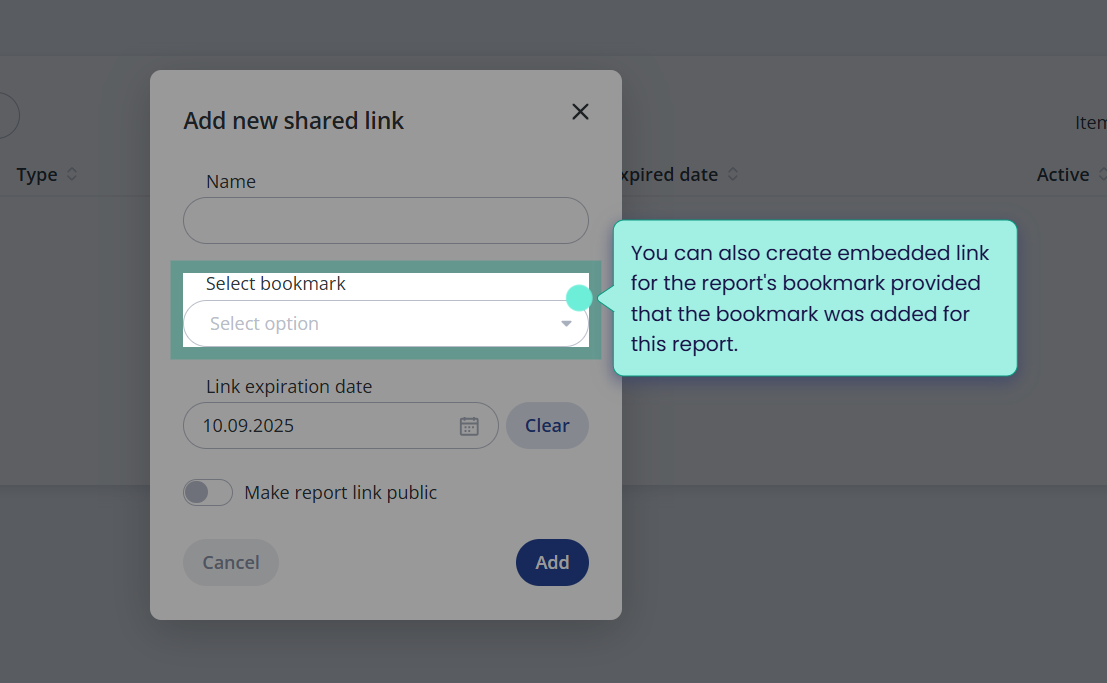
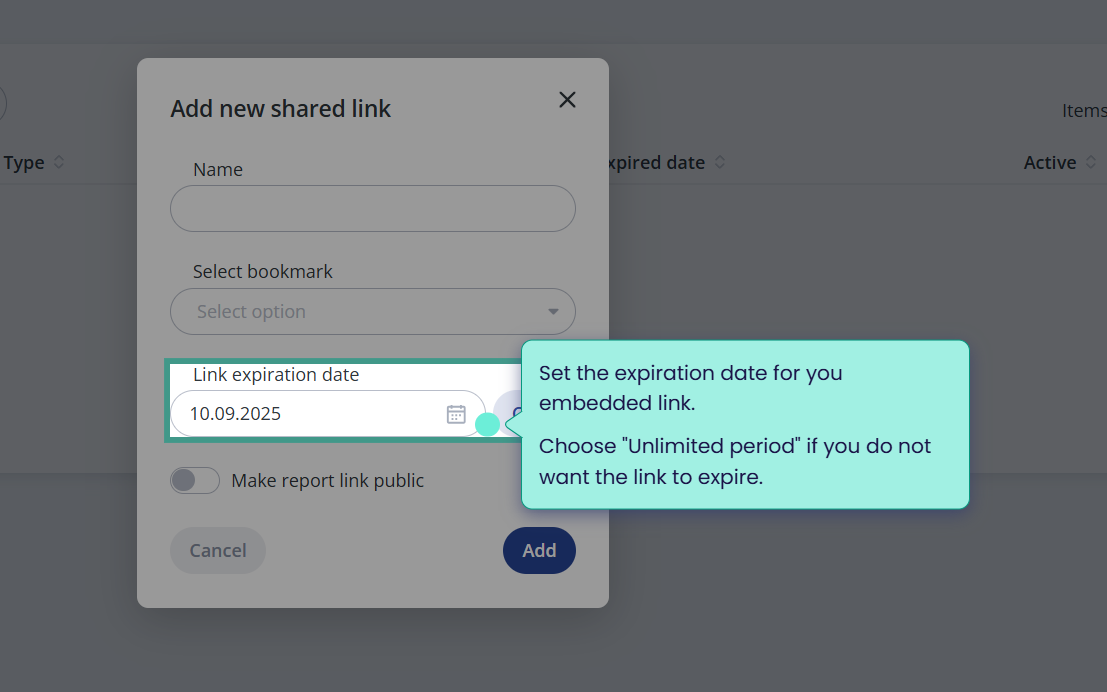
How to create BI Book report embedding link
/rails/active_storage/blobs/redirect/eyJfcmFpbHMiOnsibWVzc2FnZSI6IkJBaHBBakFEIiwiZXhwIjpudWxsLCJwdXIiOiJibG9iX2lkIn19--f10e25f542b6b32dc7d4c9217e6633e5b8d3fc34/1.png
/rails/active_storage/blobs/redirect/eyJfcmFpbHMiOnsibWVzc2FnZSI6IkJBaHBBakVEIiwiZXhwIjpudWxsLCJwdXIiOiJibG9iX2lkIn19--f139e225c1ca14159e52702771742c17dc4f795b/2.png
/rails/active_storage/blobs/redirect/eyJfcmFpbHMiOnsibWVzc2FnZSI6IkJBaHBBaklEIiwiZXhwIjpudWxsLCJwdXIiOiJibG9iX2lkIn19--06aae3f06b7ef97cb818dc6cdc0d140d672df1f8/3.png
/rails/active_storage/blobs/redirect/eyJfcmFpbHMiOnsibWVzc2FnZSI6IkJBaHBBak1EIiwiZXhwIjpudWxsLCJwdXIiOiJibG9iX2lkIn19--ac6d25d9b526cb352f0e6cb58c231c9ebd5e33bc/4.png
/rails/active_storage/blobs/redirect/eyJfcmFpbHMiOnsibWVzc2FnZSI6IkJBaHBBalFEIiwiZXhwIjpudWxsLCJwdXIiOiJibG9iX2lkIn19--d823187afd4a4ca8bc3fd87e7dc95608488f6db8/5.png
/rails/active_storage/blobs/redirect/eyJfcmFpbHMiOnsibWVzc2FnZSI6IkJBaHBBalVEIiwiZXhwIjpudWxsLCJwdXIiOiJibG9iX2lkIn19--f020002e8baddeb46d4986159539d5222565f67b/6.png
/rails/active_storage/blobs/redirect/eyJfcmFpbHMiOnsibWVzc2FnZSI6IkJBaHBBallEIiwiZXhwIjpudWxsLCJwdXIiOiJibG9iX2lkIn19--4b954983e8b5b56c0db915d3082b633b6b4b1e47/7.png
/rails/active_storage/blobs/redirect/eyJfcmFpbHMiOnsibWVzc2FnZSI6IkJBaHBBamdEIiwiZXhwIjpudWxsLCJwdXIiOiJibG9iX2lkIn19--828498903479fe88635ee2832120db84b7bbf473/8.png
/rails/active_storage/blobs/redirect/eyJfcmFpbHMiOnsibWVzc2FnZSI6IkJBaHBBamtEIiwiZXhwIjpudWxsLCJwdXIiOiJibG9iX2lkIn19--81205d8c62503e240dc90ba4e4d856a527ba6094/9.png
/rails/active_storage/blobs/redirect/eyJfcmFpbHMiOnsibWVzc2FnZSI6IkJBaHBBam9EIiwiZXhwIjpudWxsLCJwdXIiOiJibG9iX2lkIn19--ff4b89da78ab6dd136264a7e68af3504eaff960e/10.png
/rails/active_storage/blobs/redirect/eyJfcmFpbHMiOnsibWVzc2FnZSI6IkJBaHBBanNEIiwiZXhwIjpudWxsLCJwdXIiOiJibG9iX2lkIn19--2f9941cff43985d9e53cfac0aabef6201ed2b804/11.png
/rails/active_storage/blobs/redirect/eyJfcmFpbHMiOnsibWVzc2FnZSI6IkJBaHBBandEIiwiZXhwIjpudWxsLCJwdXIiOiJibG9iX2lkIn19--8ff73a6ca7ae6c90ed3a5eb96d7c28b38c967b2d/12.png
/rails/active_storage/blobs/redirect/eyJfcmFpbHMiOnsibWVzc2FnZSI6IkJBaHBBajBEIiwiZXhwIjpudWxsLCJwdXIiOiJibG9iX2lkIn19--56c0ac68dc0ec977f87a3ff790d65fd22ba4b460/13.png
/rails/active_storage/blobs/redirect/eyJfcmFpbHMiOnsibWVzc2FnZSI6IkJBaHBBajREIiwiZXhwIjpudWxsLCJwdXIiOiJibG9iX2lkIn19--e96506b12f355805db34558f8e19c827c7d467cb/14.png

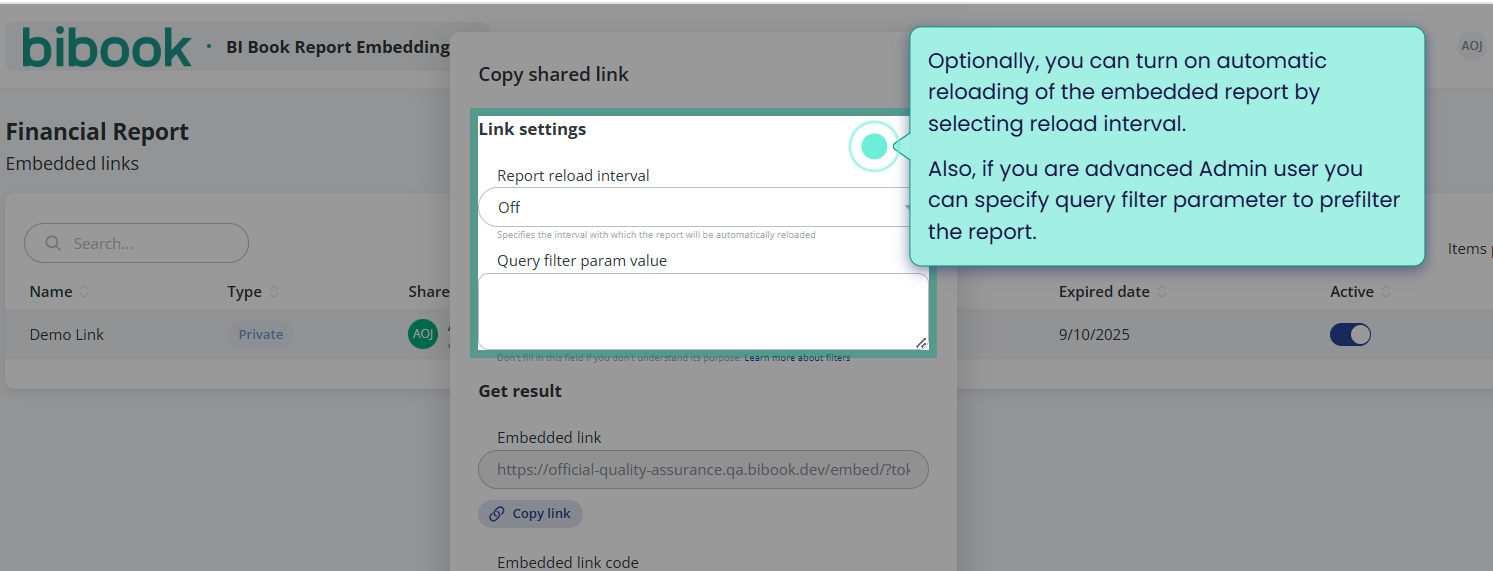
To learn how to use query filter parameters please check: Filter a report using query string parameters in the URL - Power BI | Microsoft Learn
/rails/active_storage/blobs/redirect/eyJfcmFpbHMiOnsibWVzc2FnZSI6IkJBaHBBa0FEIiwiZXhwIjpudWxsLCJwdXIiOiJibG9iX2lkIn19--a783df8c5148a8749bd924f23c72d70b3e381e52/15.png