How to activate Bezala integration
Last updated 8 months ago
Bezala is a travel expense mobile application used worldwide. BI Book Bezala connector gives you access to your data within Bezala and makes it easier to manage and share reports with others. You can find more information about basic BI Book report pricing here: Bezala pricing.
Instructions on how to connect Bezala to BI Book
Note! If you want to activate the Bezala integration for the group company, please contact support@bibook.com or your BI Book Data Analyst.
You should have a new API user in Bezala system with the access to the specific Bezala environments that you need to pull data from. This user should only have access to the environments that you need to use for your report, and not any others. Contact Bezala support ( support@bezala.com) or your Data Analyst for adding new API user. Note! It is important to note that you cannot use existing Bezala userr's credentials for this integration, as they may have access to multiple environments.
Activate Bezala integration in BI Book
Log in to BI Book with your credentials and administrative rights.
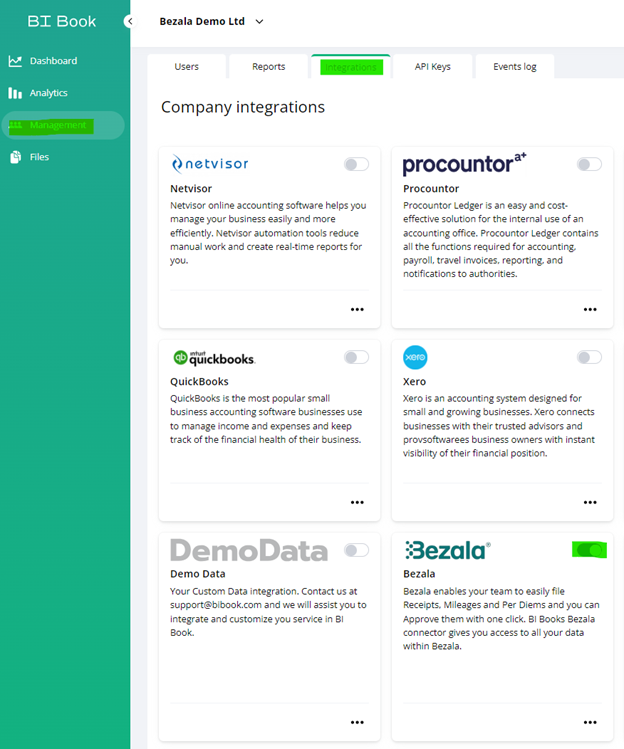
Go to Management, choose the Integrations tab, and look for the Bezala integration. Click the button next to it.
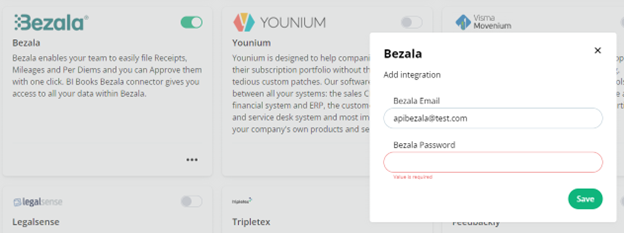
Fill in the API user credentials in the pop-up window:
You'll receive the confirmation email that your Bezala integration has been activated in BI Book.
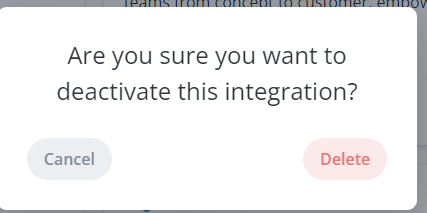
You can also deactivate the integration directly from BI Book. Click the same button near the Bezala integration and choose “Delete” in pop up window:
After that you’ll receive the confirmation email about the deactivation.
Please, contact us if there are any problems with the activation/deactivation or you have any questions.
Was this helpful?
Still need help? Ask the team