BI Book Power BI Connector
Last updated 8 months ago
Note: Currently our BI Book connector is only available as a custom connector. We are in the process of getting our connector Microsoft certified so that you can use it out of the box in Power BI. If you are interested in using the custom connector already, contact support@bibook.com
How to use the connector
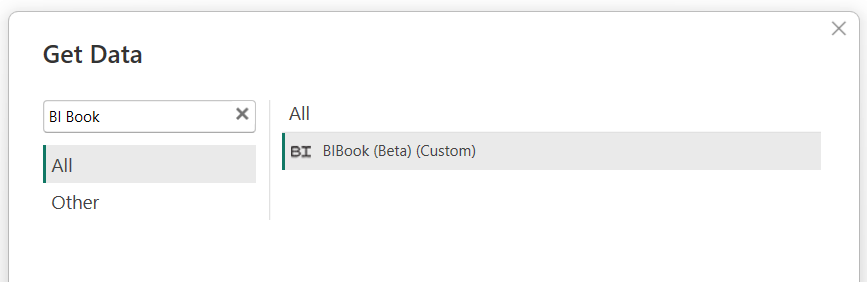
Step 1: Lookup the BI Book connector in "Get Data"
Step 2: Enter the BaseUrl and your company id
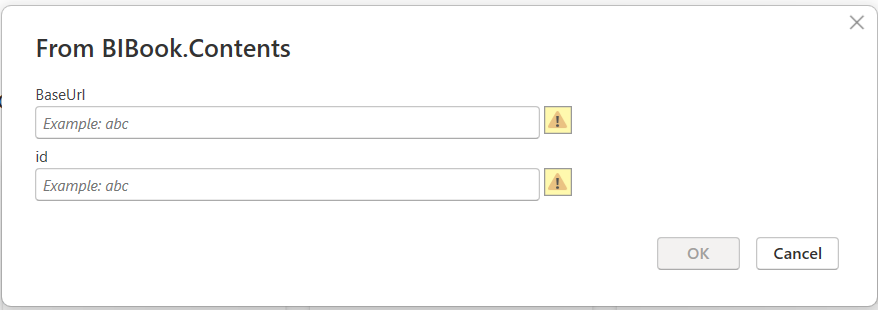
Note: The BaseUrl you should use is https://bibook.com and you can find your Company Id in the management tab in BI Book. This requires administrator role.
Step 3: Authenticate to BI Book using username and password
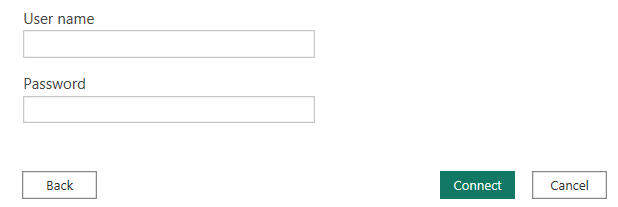
Note: You can find the username and password in the management/apikeys tab in BI Book. This requires administrator role.
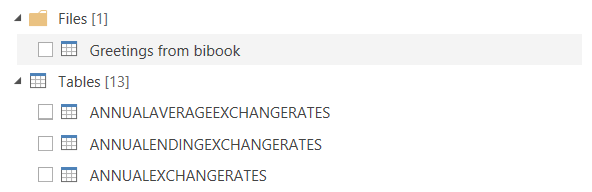
Step 4: Read in the Data
Now you have efforless access to all your BI Book files and SQL tables through an easy to use connector!
Remember: We have built data pipelines to over 50+ systems and we are continuously adding support for more systems in BI Book. Checkout out our available connectors here: Connectors (bibook.com) When activating the connectors through BI Book all of your activated systems' data is ready to be used and explored by you in Power BI through these steps described in the article!
Ps. Please help us get the connector certified by upvoting this idea: https://ideas.fabric.microsoft.com/ideas/idea/?ideaid=25c48555-5b8f-ee11-a81c-000d3a00bef9
Feel free to contact support@bibook.com in any questions!
Was this helpful?
Still need help? Ask the team