How to share root folder with user(s)
Last updated 8 months ago
🎯This article describes what the root folder access is and explains how the Admins can share it with Users and/or User Groups.
Root folder - the highest level folder in BI Book that contains ALL the BI Book reports, files, forms, folders. Admins can easily access the root folder by navigating to the Content page in the Company Portal.
You can share all content with a user without needing to assign them an Admin role by simply sharing the root access. To do so navigate to “Content” page → press “Share Root” button:

a. on “Users” tab select users you want to share the root with → select either “Can view” or “Can edit” permission level (see help.bibook.com/en/articles/bi-book-access-management for more information on the permission levels) → press “Apply” or
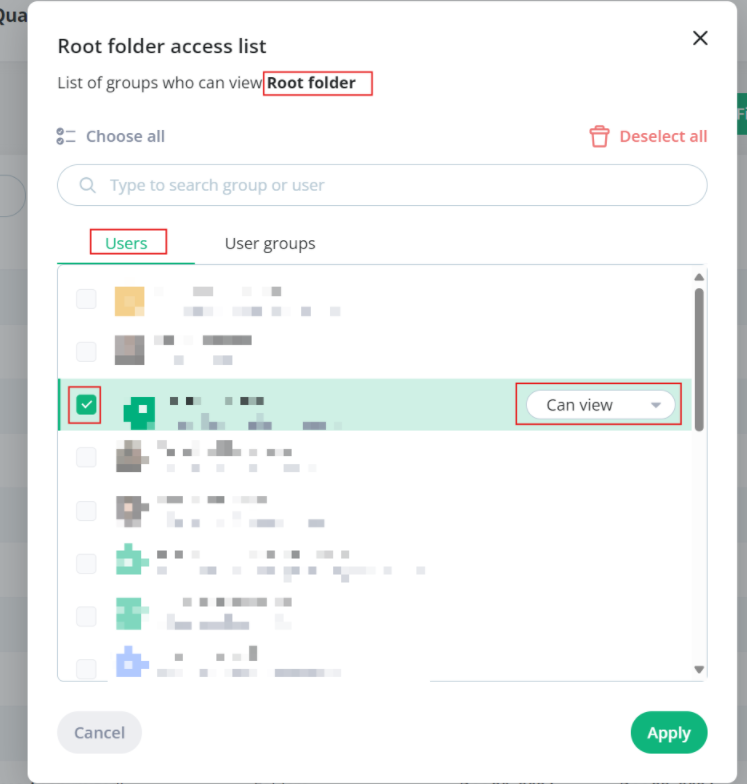
b. you can select user groups to share the root with - navigate to “User groups” tab → select the “User groups” to share the root with → press “Apply”
Recommended articles
BI Book Access Management help.bibook.com/en/articles/bi-book-access-management
Creating and Managing User Groups help.bibook.com/en/articles/creating-and-managing-user-groups
Was this helpful?
Still need help? Ask the team